As field operations expand across sites and contractors, it becomes harder to apply the same assignment rules, site requirements and service deadlines to every job. Field service automation helps teams apply those rules consistently and brings exceptions to the attention of coordinators and dispatchers.
In 2027, equipment data and AI could help teams spot those exceptions earlier and decide how to respond. Equipment readings can flag a developing fault between scheduled visits, while AI can help dispatchers identify which jobs can be rescheduled to accommodate an urgent callout. How well these workflows work in practice depends on the quality of assets and job records, and how reliably information moves between systems.
What is field service automation?
Field service automation is the use of software to carry out routine field service tasks, such as creating work orders, assigning jobs, escalating delays and routing completed work for approval. It supports field service management, which covers the broader planning and coordination of people, assets and service delivery.
An automated workflow starts when a defined event occurs, such as a maintenance date falling due, a service request being logged or a technician submitting an inspection. The system then applies the relevant rules. It can assign a job based on the site and skills required, alert a coordinator if an agreed response deadline is approaching, and check that the required readings and photos are attached before sending the job for sign-off.
Work order creation and assignment
A work order can start with a service request, a maintenance schedule or an inspection finding. For example, for a quarterly air-conditioning service, the schedule can create a job for each site with the equipment details, due date and checklist. A recurring job can be assigned according to site and trade, while a request with unclear access requirements can go to a coordinator for review.
The same principle applies beyond buildings. A utility might generate recurring inspections for equipment across its network, while a telecoms team might route a fault to the contractor responsible for that region. In each case, the team needs to define what creates the job and who should receive it.
Mobile inspections and job close-out
A mobile workflow can give technicians the asset history, access instructions and checks they need on site. Technicians can record readings, note any parts used and attach photos or a service report. The workflow can require the relevant evidence before the job moves to sign-off. With offline access, technicians can capture those details in a basement plant room and synchronise the record when connectivity returns.
Service deadlines and contractor reporting
The same work order can show when the contractor was assigned, when they attended and what they found. A service-level agreement (SLA) rule can flag a job approaching its response deadline. When managers review performance across sites, the job history helps them distinguish a late response from a repeat fault or a repair that’s awaiting parts. Each calls for a different response.
What to expect from field service automation in 2027
Scheduling that adapts when priorities change
Teams can already use scheduling rules to assign routine work based on technician availability, skills and location. As 2027 draws nearer, those same details can help dispatchers weigh up their options when the day’s plan needs to change.
If an urgent breakdown comes in while a contractor is carrying out scheduled maintenance, the system could recommend which visits to move based on technician availability, site access and service deadlines. The dispatcher can then decide whether to follow the recommendation - taking into account any commitments to customers and the impact of delaying work on critical assets.
More work orders triggered by equipment data
Scheduled servicing gives teams regular opportunities to check equipment. In 2027, more teams are likely to use data from connected assets to pick up problems between visits and automatically raise work orders when those problems need attention.
For example, if a building management system detects that an air-handling unit is repeatedly operating outside its normal temperature range, it can pass the alert to the field service system. The alert can then be linked to the asset and used to create a work order with the relevant readings attached, giving the technician a starting point for the investigation. Teams can set rules for which alerts warrant a visit and how to handle repeat alerts when a job is already open. This is easier to put in place where critical equipment is already monitored and can be reliably matched to its asset record.
AI assistance for job history and inspection records
AI can help technicians prepare for a visit by pulling together information from previous work orders, inspection results and service notes. If a technician is called back to the same air-handling unit, for example, an AI-generated summary could highlight when the fault was first reported, what previous technicians checked and which parts were replaced. It could also flag that the same fault was reported again after a repair, giving the technician a more informed starting point for the next visit.
During an inspection, an AI assistant could turn a technician’s spoken observations into a draft record. For example, if the technician says the filter was replaced, the fan was noisy on start-up and a follow-up visit is needed, the assistant could put each detail into the relevant field. The technician can then review the draft, confirm that any readings were captured accurately and add their assessment before submitting it.
Both use cases depend on the information the assistant can access. If a repair was logged against the wrong asset or a contractor’s report is stored in a separate system, the summary may miss a previous diagnosis or recommend a check that has already been done. Linking the summary back to the original work orders and reports gives the technician a way to check those details before deciding what to do on site.
How Forcelink supports field service automation
Forcelink brings planned maintenance, field work and service reporting into the same workflow. When a recurring service is due, Forcelink can generate a work order with the asset details and inspection requirements. A coordinator can schedule and dispatch the job to an in-house team or contractor and track it against the agreed service deadlines. On site, technicians can complete the inspection offline and sync their findings to the asset’s service history when they reconnect.
The workflow can also start with an equipment alert. Where a building management system is integrated with Forcelink, teams can define which alerts should raise a work order and when an issue should be escalated.
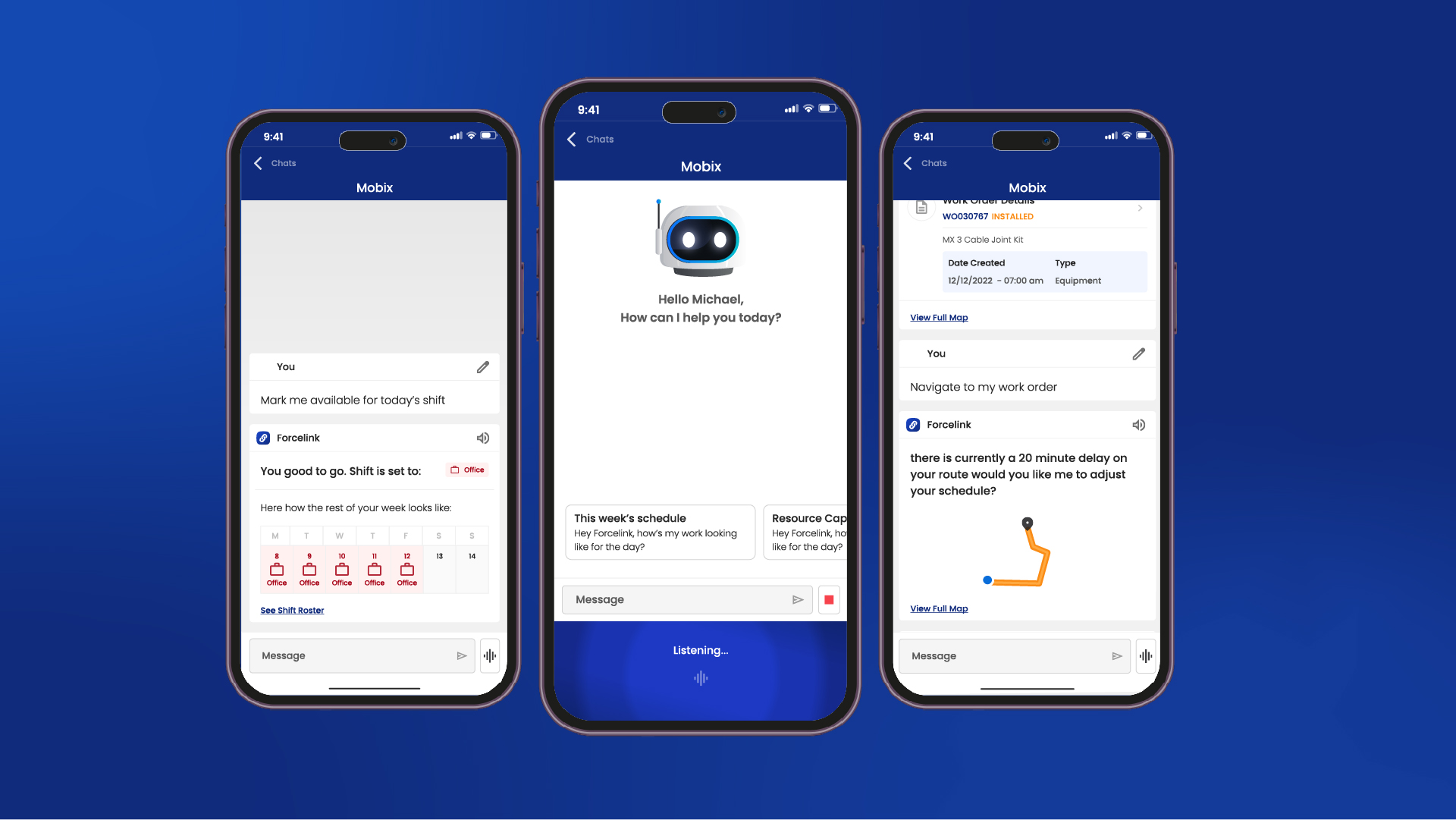
Forcelink already offers AI-assisted scheduling and dispatch. The next phase of Mobix will extend AI assistance to other parts of the workflow. These capabilities are being introduced first in the Forcelink Back Office, with mobile capabilities planned.
In 2027, the opportunity is to connect more of the steps that teams still coordinate by hand. The readings that triggered a job can travel with the work order, the technician’s findings can support sign-off, and the completed record can help the next team investigate a repeat fault. For facilities teams working across several buildings, that means less time piecing together what happened at each site.
Request a Forcelink demo to see how these workflows could support your sites, teams and service requirements.